


Sounds are an important part of Warcraft maps, giving audible feedback to the player. For example every time you complete a quest, the QuestCompleted sound is played (in campaigns).
To play your own sounds, all you have to do is invoke the Sound Editor by pressing F5:
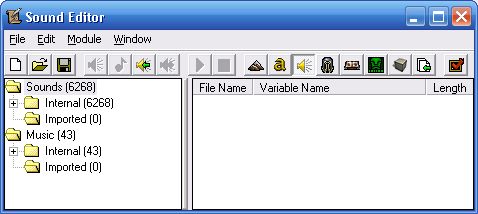
- The Sound Editor
Then either import your own sounds (WAV or MP3 format) by clicking File → Import Sound… (CTRL + I) or pick some from the 6311 built-in sound-effects.
After importing/picking is done, right click on a file and select Use as sound:
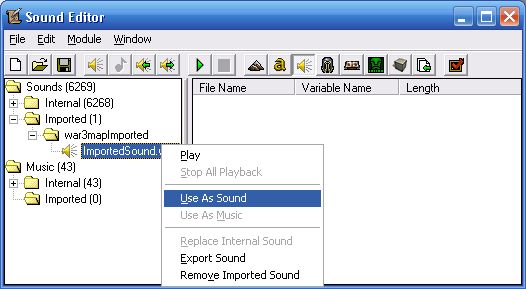
- Right click → Use as sound
It is important that 3D sound in the Sound Properties is not checked:
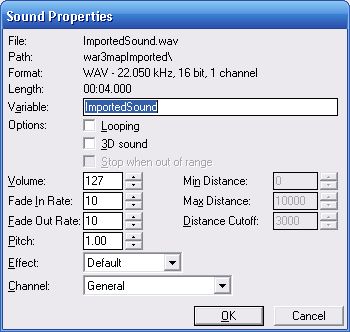
- 3D Sound must be unchecked
And finally playing the sound is as simple as using the Sound - Play Sound function:
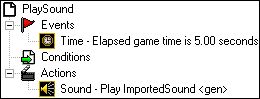
- Trigger that Plays a Sound

December 18th, 2009 at 1:35 am
Nice I wanted to get sounds working on World Editor.
Thanks,
Thurst4blood
August 22nd, 2011 at 10:10 pm
This is not multi-instanceable, but useful for GUI.
Edited by 3ICE: Removed fake e-mail address and website, removed all flaming, fixed spelling mistakes.
March 3rd, 2012 at 4:03 am
Hi,
Actually, MUI (If you can't spell it, just abbreviate it.) is not affected here.
All I'm doing in that trigger is playing a sound 5 seconds into the game for everyone to hear.
–3ICE
p.s.: Sorry about the late response, your comment was marked as spam (because of your fake website, invalid e-mail, lots of flaming), by Akismet and I only found it today. (Akismet is a wonderful service by the way, this is my first false positive with them and I have thousands of spam caught.)
March 31st, 2012 at 7:49 pm
Hi, please i have problem in my warcraft 3…..i watch ,,NARUTO´´ its anime serial and i try creat my map with naruto models and ofcrourse with ,,jutsu´´ sounds….. please help me i have one character and i have 3 sounds…..but when i use spell…all sounds are playing. I want know how fix this…… i want use spell and have the right sound no all 3 in one time….
Please help me….. Write me on this Email: -removed-….Thank for all help….
Edited by 3ICE: Removing email.
March 31st, 2012 at 7:50 pm
Hi,
Would you like a random sound to be played from a pool of 3 possible choices every time the spell is cast?
If yes, you can achieve that by generating a random number between 1 and 3, then checking which number it was; 1, 2 or 3. If it was 1, play sound1, if it was 2, play sound2, if it was 3, play sound3.
If this was not your goal, please explain further.
–3ICE
p.s.: There is an [ENTER] key to the right of the period key. Try replacing your dots ("……") with new lines. It's a first step towards achieving proficiency in English grammar, style, and usage.
March 31st, 2012 at 8:18 pm
For eplain i shere here link what i think youtube/watch?v=5md0XHBc2cI . Here is one hero… i think you will undestand what i want..
March 31st, 2012 at 8:19 pm
I watched the video but I don't see where playing 1 of 3 sounds comes in.
March 31st, 2012 at 8:22 pm
He use spell and the spell have sound… when he activate the spell auto. the hero start saying spell name…for explain name of Spell: Fuuton Rasen Shuriken
Hero say: Fuuton rasen shurike
I want this effect.
March 31st, 2012 at 8:23 pm
Ah!
You can sovle that with a trigger:
SPELL1
Events
Unit - A unit Begins casting an ability
Conditions
(Ability being cast) equals to [SPELL1]
Actions
Sound - Play [SOUND1]
March 31st, 2012 at 8:39 pm
How can i creat water wall…but i want spell…..and when is water reales i want use i same time light psell…..It does Xdmg and throw him away…. can you help me with this?
youtube/watch?v=72qkhMc0-ZE something like this but ofcourse in WArcraft …. :D
Edited by 3ICE: Merged doublepost
March 31st, 2012 at 8:41 pm
Hi,
This is not a help forum, but a blog post about sounds.
Go here (3ICE's Map Vault) or here (3ICE's Warcraft 3 World Editor Help Forum) for help.
June 9th, 2012 at 4:44 am
I have a problem playing sounds, can you please help?
my code is like this
Sound play
events:
unit-a unit starts the effect of an ability
conditions:
(ability being cast) is equal to [raikiri]
actions:
sound- play raikirisound
I also tried attaching it into the caster
actions:
sound-play raikirisound at 100% attached to casting unit
at the first two or third execution of the spell it played, but after casting it four times and above, it doesn't play anymore.
how do I fix that? please help.
June 9th, 2012 at 8:08 am
I'd have to see the map.
August 13th, 2012 at 10:44 pm
In my Editor i cant even choose 3D Sound and where you have channel 1 I have channel 2. why ? i'm trying to make a sound for a spell….
August 14th, 2012 at 8:10 am
I assume 1 channel means mono, and 2 channels mean stereo.
Stereo sounds can't be 3D sounds because 3D sounds are simulated by taking a mono sound and playing it through both speakers (thus making it stereo) but with different intensity in each, creating the 3D effect.
At least that's what I think.
Convert your 2 channels sound file into 1 channel with Audacity. (First result on google.)
August 29th, 2012 at 8:54 pm
hi i've got problem with playing imported sound,when my first cinematic started there is no sound to play
Events
Map initialization
Conditions
Actions
Cinematic - Turn cinematic mode On for (All players)
Sound - Stop music Immediately
Sound - Stop the currently playing music theme
Cinematic - Send transmission to (All players) from Arthas (wielding Frostmourne) 0000 named Arthas Menethil: Play ArthasSound1 and display go to next link,. Modify duration: Set to 29.00 seconds and Wait
Cinematic - Turn cinematic mode Off for (All players)
August 29th, 2012 at 9:49 pm
Can I see the map?
Post it over at the Map Vault
–3ICE